If you want to use Page Jarvis with Groq’s free daily credits, the setup is pretty simple: create a Groq API key, paste it into Page Jarvis, choose a Groq-supported model, and start using the extension inside your browser.
The big advantage is cost. Groq is fast, and if your account has free developer usage available, you can test Page Jarvis without paying for every request right away.
Step 1: Create a Groq account
Go to Groq Console:
Sign up or log in, then open your developer dashboard.
Step 2: Generate your API key
Inside Groq Console (https://console.groq.com/keys), create a new API key.
Groq’s docs use the environment variable name GROQ_API_KEY, which confirms this is the key Page Jarvis should use for Groq requests.
A few quick tips:
- keep the key private
- copy it immediately after creating it
- if you ever expose it publicly, rotate it
Step 3: Check that your account has free usage available
Groq’s plans, rate limits, and model availability can change, so check your current dashboard before relying on it heavily.
What you’re looking for:
- free developer usage or credits
- active API access
- available models on your plan
If Groq shows usage limits or daily caps, that is what Page Jarvis will be using under the hood.
Step 4: Open Page Jarvis settings
In Page Jarvis, go to the provider or API settings area and choose Groq as your model provider.
Then paste in your Groq API key.
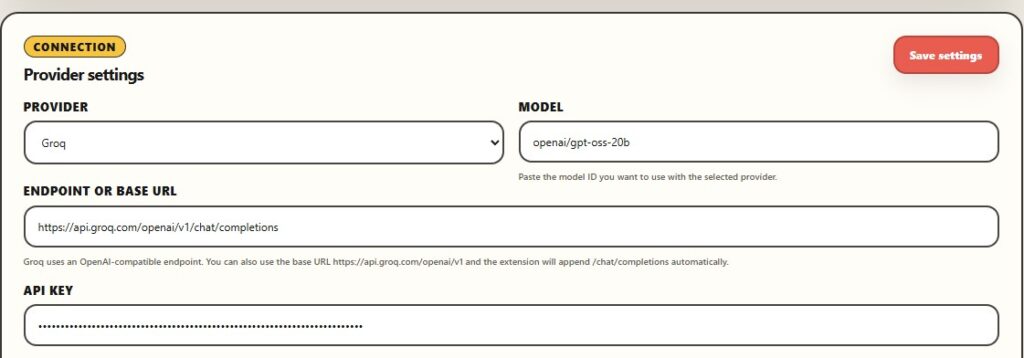
Step 5: Pick a Groq-supported model
Groq’s docs currently list models such as:
qwen/qwen3-32bgroq/compoundopenai/gpt-oss-20bopenai/gpt-oss-120b
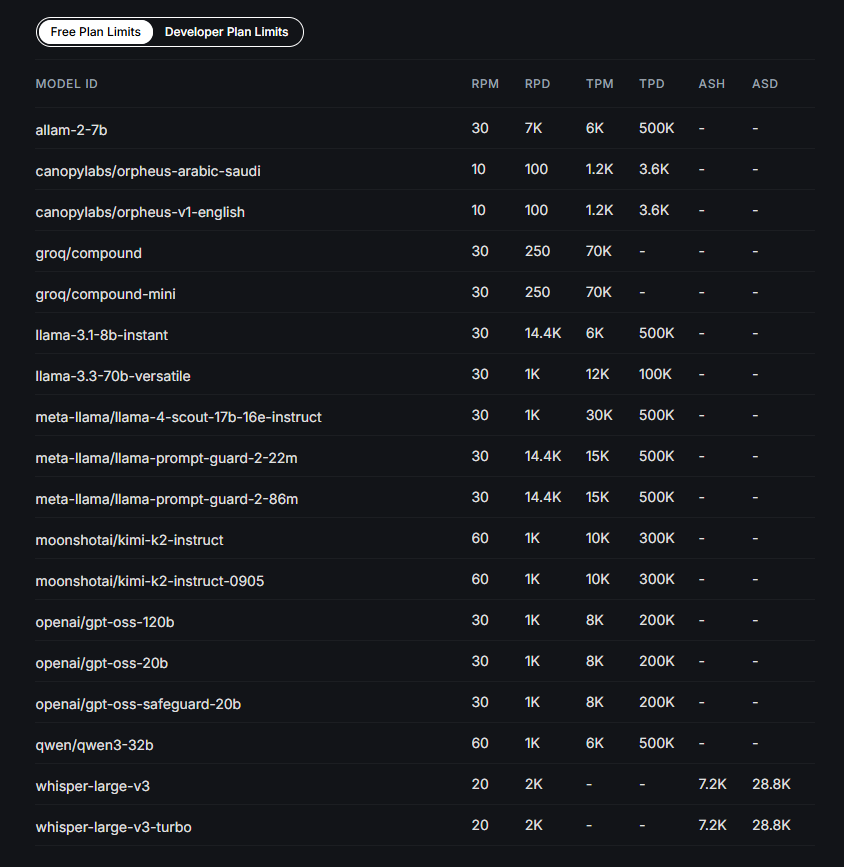
Pick whichever models Page Jarvis supports in its provider dropdown or custom model field.
For lightweight everyday use, a smaller/faster model is usually the best place to start.
Step 6: Test it inside the browser
Now go to any page where Page Jarvis is useful:
- Google Docs
- Gmail
- Notion
- article pages
- forms or CMS editors
Then try a simple action like:
- highlight text and rewrite it
- summarize a page
- ask a question about the page
- shorten a draft reply
If the result comes back normally, Groq is connected.
Step 7: Stay within the free daily limit
If you are using free daily credits, a few habits help:
- use shorter prompts when possible
- avoid unnecessarily long page context
- pick faster/smaller models for routine tasks
- save your heavier usage for the edits that matter most
If requests suddenly stop working, you may have hit your daily usage cap and just need to wait for the reset.
Final tip
Groq is a great fit for Page Jarvis because the product is built around fast, in-browser workflows. If your goal is quick rewriting, summarizing, and page-level help without tab switching, Groq’s speed makes the experience feel especially smooth.
Leave a Reply